Blocking social media: how to keep your mornings for yourself
16 November 2026, by Niels Luka
Short answer: blocking social media works best when you set the limit the night before and your apps only open after you've done something for yourself. A time limit is one tap away from being switched off in the morning. The Morning Work ties the lock to your journal: first you write, then your apps open.
You wake up. Your hand is reaching for your phone before your eyes are fully open. A quick look at Instagram, your email, one more video. Twenty minutes later you're in the shower with someone else's head on your shoulders: their holiday, their opinion, their work.
Sound familiar? Then you're in the right place. Here's how to block social media in a way you'll actually stick with, what your options are, and why we chose a journal with an app blocker.
Why block social media in the morning?
The first hour of your day sets the tone. Start by scrolling and you're reacting to what other people want from minute one. You're busy before you've even thought about what matters to you today.
Start with yourself and by half past eight you already know what you're going to do today. That one conversation. The gym bag that's been sitting in the hallway for weeks. The sign-up you keep putting off. That's what a morning that belongs to you feels like!
Less screen time is a nice bonus. What you really get back is a calm head and a day that starts with your plan.
Why doesn't willpower work?
At night you promise yourself: tomorrow, nothing first thing. And in the morning your phone is right there next to your bed, with a little red dot on your favourite app. You have to make the call at the exact moment you're least sharp, barely awake and still half dreaming.
That's why a limit works better when you set it in advance. Set it the night before. Then in the morning all you have to do is what you already agreed with yourself.
What are the ways to block social media?
There are roughly four kinds of tools. They all work differently, and different things suit different people.
Screen Time on your iPhone. Apple built it in. You set limits on apps or schedule downtime. Free and quick to set up. Most people know the catch: when the limit runs out, you tap ignore and you're back in.
Blocker apps like Opal. Opal uses Apple's Screen Time features to block apps during sessions you schedule or start on the spot. There's also a strict mode you can't cancel during a session. Great if you want to focus on work during the day.
A pause before an app opens, like one sec. one sec doesn't block anything. It makes you take a breath before an app opens, then asks whether you really want to open it. That one moment is often enough to catch yourself reaching on autopilot.
A physical object, like Brick or Unpluq. With Brick you tap your phone against a separate block and the apps you chose stay locked until you tap again. Unpluq uses a small tag on your keyring that you hold against your phone to open blocked apps. The upside: you actually have to get up or go looking, and that little bit of effort goes a long way.
All of these tools do one thing well: they take the distraction away. What they don't give you is something to do instead. And for your mornings, that's exactly what matters.
What do you do with the time you get back?
Say your apps are locked. You're sitting on the edge of your bed. Now what? Without a plan you'll pick up your phone anyway, for the weather, the news or an app that isn't locked. A gap wants filling.
That's why blocking works best with a set habit to replace it. For us, that habit is writing. Five to ten minutes, four questions, by hand. You take an honest look at where you are, choose what you'll do differently, feel who you are when you make that choice, and write down one concrete action for today.
How does a journal with an app blocker work?
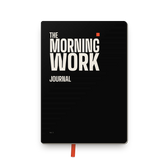
The Morning Work is the first journal in the world with an app blocker. This is how a day goes:
- At night, the apps you choose lock at the time you choose. Instagram, TikTok, and your email too if that's where your first hour goes.
- In the morning you grab your journal and answer the four questions for that day: Notice, Choose, Feel and Act.
- Done? Hold your phone against the back of your journal and your apps open.
- At night, when your apps lock again, you read back at Prove whether you did what you wrote down.
So in the morning there's nothing to decide. The limit is already set, and you spend the time you get back on yourself straight away. Read exactly how a day works.
What if I really need my apps in the morning?
It happens. A shift that starts early, a message that can't wait. In the app you set a latest time, and your apps open then no matter what. For real exceptions there's an emergency button in your profile. Don't have your journal with you? Then you do the questions in the app that day.
The lock is there to help you. Miss a morning and you simply pick up the next day.
How can you start tomorrow?
You don't have to wait for a new year or a quiet week. Here's what you can do tonight:
- Leave your phone outside your bedroom, or at least out of reach.
- Lock the apps you grab first thing, with Screen Time or a blocker.
- Put a pen and paper ready, and tomorrow write down first what you want to do today.
Catch yourself tapping ignore again? Then you know you need a limit you can't just switch off yourself. That's what the journal was made for.
Is this for you?
If you know what you want but your day keeps starting on someone else's screen: yes. In 66 days you'll do what you promise yourself. Your apps only open once you've written.
No difference after 66 days? 100% money-back guarantee.
Order your journal and start your mornings with yourself again. You can wait for the right moment, but it never comes.